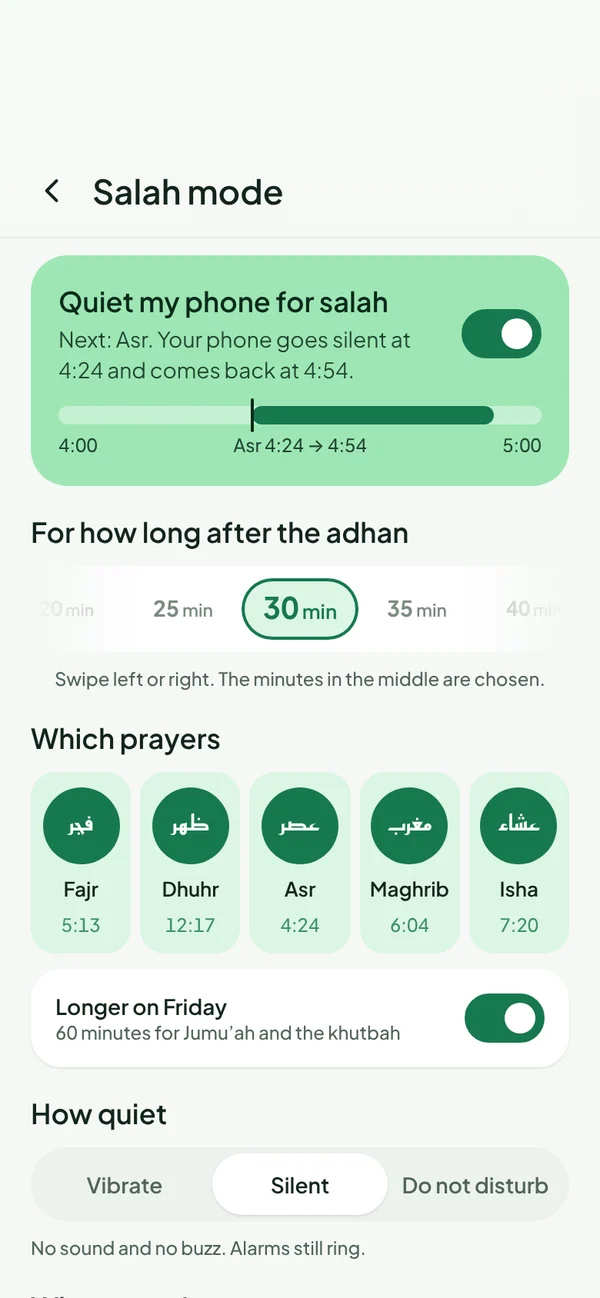
Salah mode silences your phone when the prayer comes in, or the moment you walk into your masjid, then turns the sound back on afterwards. No more phones ringing in the saff.
Choose when Salah mode starts: at each prayer time, when you arrive at your masjid, or both. Choose how quiet: vibrate, silent or Do Not Disturb.
Quiet for 5 to 60 minutes after the azan, 30 by default
Longer cover on Fridays for the khutbah and Jumu’ah
Pick which prayers it covers
Alarms still ring
On Android and iPhone
On Android, Salah mode is fully automatic. On iPhone, Apple doesn’t let apps change the ringer, so Muslim Daily sets up a Prayer Focus with you once and then it’s one tap.
Part of Muslim Daily Plus
Salah mode and your masjid’s jamaat times are Plus features. Prayer times, azan, Qibla, Quran, duas and the salah tracker stay free, with no ads.
Questions
Can my phone go silent automatically at prayer time?
Yes, with Salah mode in Muslim Daily Plus. On Android it switches automatically; on iPhone it uses a Prayer Focus that you set up once.
Does the sound come back on after salah?
Yes. After the time you choose, 30 minutes by default, your phone goes back to normal by itself.
Will my alarms still ring?
Yes. Salah mode quiets calls and notifications, not your alarms.